So once again many moons have been gone by since our last blog post, and once again we are going to try not to do a repeat (or lack thereof?) performance.
What have we been up to? Mostly more of the same, meaning we have been working on our NES Reproduction shop - maturing it and really getting our wheels spinning with it. While we have not released as many games as I would have liked I am very pleased with the products we have and our customer satisfaction.
That being said we are now looking only to improve and branch out into other areas. We are on the verge of releasing some new products - including but not limited to decals for the wall or car and retro console modding.
Because this is not just a blog for the business and honestly I am a huge fan of everything we do (and classic gaming in general) I am going to catch you, dear internet friend, up on things I have been doing gaming wise for the last few months.
I have started building a small private Retro Fools collection. When we (my brother and I) were younger we had a moderate sized collection, mainly NES and SNES which was mostly lost years ago when my LAN center got robbed. So naturally lately we have been in a very good position to start building it back up.
Some of my favorite pickups lately have been a Turbo Grafx 16 and a Sega 16, both items that I have wanted ever since I was a kid. The games I have been playing mostly are Sonic CD, Popful Mail and Vay.
I have joined 2 awesome communities - NintendoAge and a local Long Island Classic Gaming Group on Facebook. Granted the Facebook group is much smaller but it is a lot of fun since everyone is local and you can easily meet up for trades and just shoot the shit, gaming wise.
We've also been fixing up the arcade in the garage, keep an eye out for a post in the near future about it. Also keep an eye out for a post regarding the modding services we will offering and kind of a beginners guide to it all.
Wednesday, October 29, 2014

Friday, March 14, 2014
Research has begun!
So, since we have finally established a system of reworking the circuit boards reliably on the NES carts and have been failure free for a while, Ive started researching Sega Genisis and SNES repros. I have a feeling SNES will be kind of a tough nut to crack so we will probably have Genesis up and running first... its more straight forward. SNES will require adaptor boards to be soldered to the IC chips which in turn are soldered into the socket and the chips are surface mount so Im going to have to learn new soldering techniques. And of course Im one of those people that hates following instructions so Im sure trying to figure it out will be an absolute bucket of fun :) Once I begin, wish me luck withholding the overpowering urge to slam my head against the wall.
Monday, February 3, 2014
Been away for awhile, been cooking up some really neat stuff!
 We started doing some NES Reproductions and have decided to make the service public! I think from the second we made our first repro (Earthbound Zero) we were hooked, I mean how cool is it to play prototypes and translations on the actual hardware?! Yes, emulators are great and they do a very good job but let's be honest, there is nothing like the real thing, sitting down with an old NES and a shitty TV and going to town.
Anyways, if you are interested in what we are up to visit us at retrofools.com, or email info@retrofools.com.
 Since we have been asked a million times, yes we do plan on doing SNES and Genesis, we just have to recoup some of the cost of all the materials we've purchased by making some NES ones.
We are also offering some gaming related items like coasters, a NES cartridge housing a wireless router and things like that.
We will still be updating the blog with new products and anything else wacky we are messing around with at any given time.
 We started doing some NES Reproductions and have decided to make the service public! I think from the second we made our first repro (Earthbound Zero) we were hooked, I mean how cool is it to play prototypes and translations on the actual hardware?! Yes, emulators are great and they do a very good job but let's be honest, there is nothing like the real thing, sitting down with an old NES and a shitty TV and going to town.
Anyways, if you are interested in what we are up to visit us at retrofools.com, or email info@retrofools.com.
 Since we have been asked a million times, yes we do plan on doing SNES and Genesis, we just have to recoup some of the cost of all the materials we've purchased by making some NES ones.
We are also offering some gaming related items like coasters, a NES cartridge housing a wireless router and things like that.
We will still be updating the blog with new products and anything else wacky we are messing around with at any given time.
Monday, August 26, 2013
Ms. Pac-Man is a Drag Queen
 |
| Note the NES Box Art |
First and foremost the second player joystick is fucked. Next the graphics (while they look to be lovingly done) are all inkjet prinotuts and not very attractive. Third the cab is kind of beat up and the plexi-glass is shot to shit.

So I begin by researching what parts are available to purchase for this thing. Bingo, in less than 10 minutes I am on an official page that sells are kinds of parts for Ms. Pac-man machines. "Well, this isn't going to take nearly as long as I thought," said my unsuspecting brain to my.......unsuspecting brain.
 |
| Will the real Ms. Pac-Man please stand up? |
Lo and behold as I start going through all of the offerings every single picture looks completely different than what I have here in front of me. After careful cab inspection it turns out that...........................(drum roll)................this is actually a mother farking Donkey Kong Cab, fully modified from the days of its simian glory!

Well great, this slots it right into the nothing is ever easy category. Ok, no biggie I go right to see what artwork i can find, since I know nothing that I find will fit, but maybe I can rig something up. I was able to find some nice vector art for the Ms., and (what I believe to be) a correctly sized DK control panel JPG that I am using as a template.
 |
| Trying to fit a square pac peg into a round pac hole |
Two hours later (an Illustrator wizard I am not) I have something that may work, though the size of the holes for the buttons and sticks may be an issue. Daniel (Retro Fool Deuce) is going to print them out in black and white on a large format printer and we are going to match them up and see what needs adjusting.
 I also sent some pictures of the non working joystick to Andrew at The Twisted Quarter. I have no idea if it is original or aftermarket, but hopefully he can find me something that works.
So, here I am. I strongly considered converting this back to a DK as I like original stuff, but that would require obtaining the right board and to be honest I would play the Misses more than the Monkey. Updates to come soon when progress happens!
Monday, August 19, 2013
Not Emulation related, but I wanted to share a good pickup we (myself and my room-mate, with the help of my brother) got this weekend.
I was woken up at 10am with a text of, "Do you want to go to an arcade auction?" "Well yes," I thought, "I would like to do that."
So away we went and when all was said and done for under $300 we got an X-Men, Pac-Man Jr. and (2-Player) Tetris cabinet! Shitty pictures below, I will add better ones when I am able.
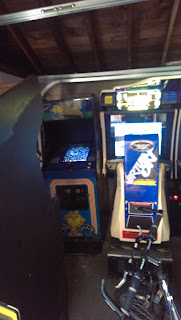

I was woken up at 10am with a text of, "Do you want to go to an arcade auction?" "Well yes," I thought, "I would like to do that."
So away we went and when all was said and done for under $300 we got an X-Men, Pac-Man Jr. and (2-Player) Tetris cabinet! Shitty pictures below, I will add better ones when I am able.


Tuesday, July 23, 2013
Apologies for the late posts, had a nasty cold for about a week there and the rest of the time was spent finalizing ConsoleBox.
Alright, not all of that is true. SOME time was spent on ConsoleBox, but let us not forget we were just through the hurricane that is the summer Steam Sale, so that was where any free time was spent (and I finally got into a pool for the first time this summer). I picked up some nice goodies including Dust:An Elysian Tail, Fez and the new Tomb Raider.
Anyhoo, some housekeeping items are finally being resolved. There were a few issues with Dolphin (Gamecube and Wii emulator), one of them being a ~90% crash on startup that for the life of me I could not fix. Error logs brought me to something with DirectX, but after trying everything under the sun relating to DX I could not fix the problem. How I finally resolved it was by using the 32 bit version! I am filing this one under don't know, don't care, so fuck it.
There was also an issue getting the Gamecube controllers C sticks to properly center. After playing with the GCPad dialog box in Dolphin I found an unnamed feature where clicking the image of the analog sticks brings up more configuration options. Pure luck, and that was fixed.
The main thing that is being an asshole to me currently is Xebra (PSX Emulator) and configuring it to work with analog sticks. This may be left as digital only for the time being, as I either wait for more information to surface or a new version.
Doing some final testing tonight, if the fates are kind and I finish I'll put up a video of it in action.
Alright, not all of that is true. SOME time was spent on ConsoleBox, but let us not forget we were just through the hurricane that is the summer Steam Sale, so that was where any free time was spent (and I finally got into a pool for the first time this summer). I picked up some nice goodies including Dust:An Elysian Tail, Fez and the new Tomb Raider.
Anyhoo, some housekeeping items are finally being resolved. There were a few issues with Dolphin (Gamecube and Wii emulator), one of them being a ~90% crash on startup that for the life of me I could not fix. Error logs brought me to something with DirectX, but after trying everything under the sun relating to DX I could not fix the problem. How I finally resolved it was by using the 32 bit version! I am filing this one under don't know, don't care, so fuck it.
There was also an issue getting the Gamecube controllers C sticks to properly center. After playing with the GCPad dialog box in Dolphin I found an unnamed feature where clicking the image of the analog sticks brings up more configuration options. Pure luck, and that was fixed.
The main thing that is being an asshole to me currently is Xebra (PSX Emulator) and configuring it to work with analog sticks. This may be left as digital only for the time being, as I either wait for more information to surface or a new version.
Doing some final testing tonight, if the fates are kind and I finish I'll put up a video of it in action.
Sunday, July 7, 2013
NES Box, Revisited
One of the issues I am correcting going forward is not skipping around everything that I do around here. When Daniel and I made the NES Box we really did a lot of work and did not post anything close to what we did. While a lot of the step by step is lost to the anals of time (I know that's spelled wrong :) I did come across some pictures of the process. So let's step in the old time machine and go way back to 2011....

The pictures below are what we started with. This was the original NES we got back in Christmas of 1987, and it was decorated with the destruction of childhood. Apparently we liked stickers. And scratching the shit out of the case.

The first step was to clean up the case by removing the stickers and sanding down the outside with very fine sandpaper. Dremeling out the raised bottom was next, as we needed every centimeter we could get.


We had our motherboard (Mini-ITX) and we had our case, but how to combine the two? Easy! Suspend it like a bat(man). Actually no Batman, just suspended like a bat.

Once we received the USB boards from Retrousb soldering the existing NES ports was a piece of cake. I even did one myself, being the one and only thing I have ever soldered. ROB also makes a cameo as he really wanted to be included in the process, even though all he did was drink and criticize the entire time...


Hard drive in a cartridge. In retrospect I regret using the gold cart but what's done is done.


Field testing the parts, making sure it work's BEFORE it's in the case.

Assembling the beast, with a Pico power supply. HDMI & power cable being ran from the mobo to the back. When I say this thing JUST fit I do not exaggerate, I am really surprised it actually worked.


Of course having more experience now we could do it much better (news of tat may be coming soon right here) but as of this date it is still running great and is a great hit at our parties, having found a semi permanent home in the garage at the tiki bar, with people sitting and playing at the bar.

The pictures below are what we started with. This was the original NES we got back in Christmas of 1987, and it was decorated with the destruction of childhood. Apparently we liked stickers. And scratching the shit out of the case.

The first step was to clean up the case by removing the stickers and sanding down the outside with very fine sandpaper. Dremeling out the raised bottom was next, as we needed every centimeter we could get.


We had our motherboard (Mini-ITX) and we had our case, but how to combine the two? Easy! Suspend it like a bat(man). Actually no Batman, just suspended like a bat.

Once we received the USB boards from Retrousb soldering the existing NES ports was a piece of cake. I even did one myself, being the one and only thing I have ever soldered. ROB also makes a cameo as he really wanted to be included in the process, even though all he did was drink and criticize the entire time...


Hard drive in a cartridge. In retrospect I regret using the gold cart but what's done is done.


Field testing the parts, making sure it work's BEFORE it's in the case.

Assembling the beast, with a Pico power supply. HDMI & power cable being ran from the mobo to the back. When I say this thing JUST fit I do not exaggerate, I am really surprised it actually worked.
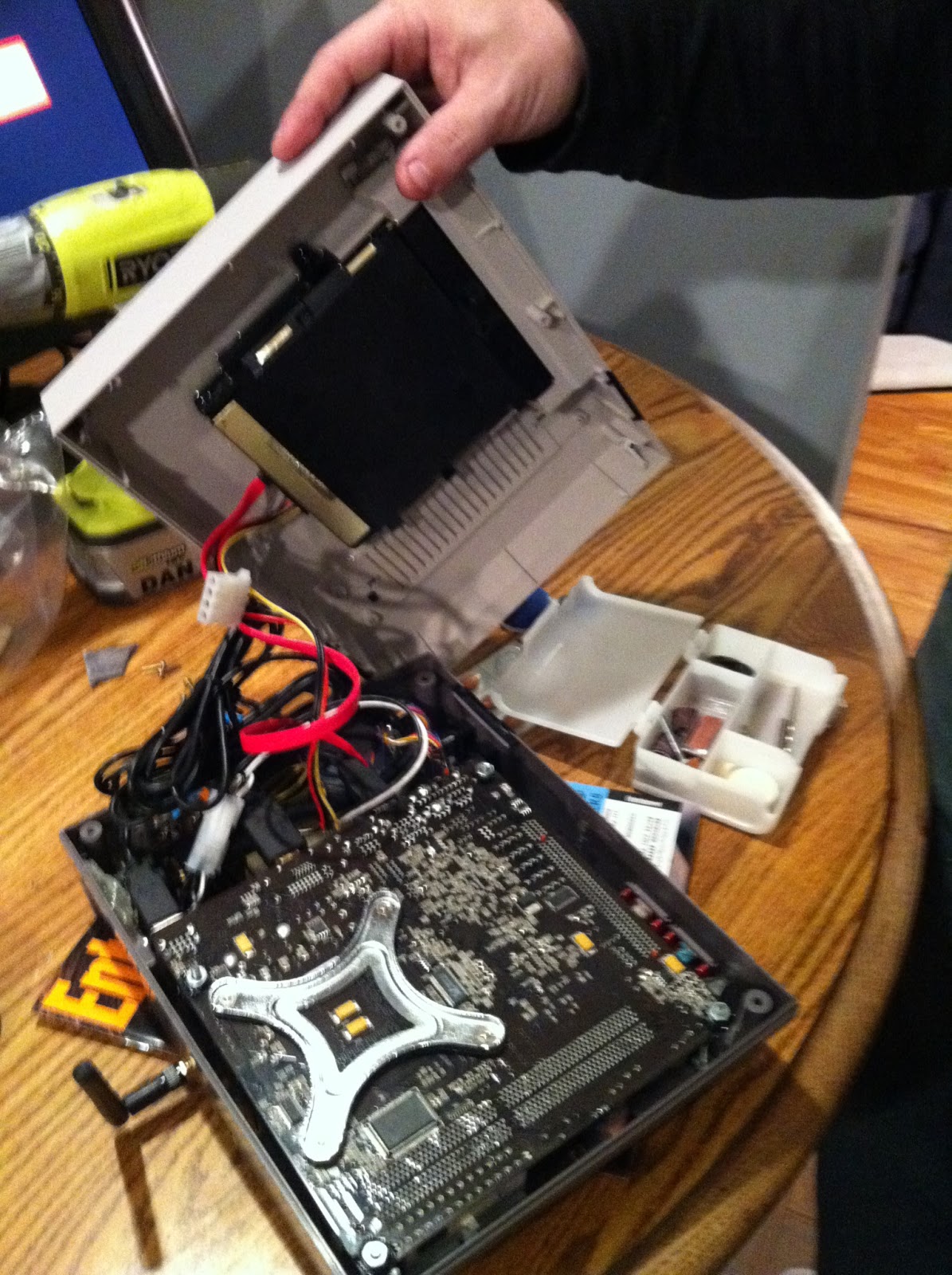


And the finished product!


Of course having more experience now we could do it much better (news of tat may be coming soon right here) but as of this date it is still running great and is a great hit at our parties, having found a semi permanent home in the garage at the tiki bar, with people sitting and playing at the bar.
Wednesday, July 3, 2013
HyperLaunch 3.0 Kicks Hyper-Ass (Apologies, I had to!)
A few days into the new HyperLaunch and I am extremely impressed.
I started to do an upgrade as outlined by the steps on the new HyperLaunch site but after 20 or so minutes I felt starting from scratch would be the easiest way to go. My folder names were all out of whack and disorganized and this would be a good way to get it all cleaned up.
After downloading a fresh install of Hyperspin and adding the applicable HyperLaunch files I was off to the races. First, how exactly is this different from the old HyperLaunch? This is like going from McDonald's into a 5 star restaurant. The HL team wrote an ENTIRE GUI application, which so neatly and logically organizes things you will never know how you lived without it.
2 hours in I had MULTIPLE systems setup completely, only because I knew exactly where to link in all the options, and could easily look at the (very helpful) module notes if something didn't work.
I
even took this new found rhythm and fixed a few things that have been
bugging me for awhile, that I had previously hit some brick walls on.
For example, for the Famicom
Disk System, some games require a disk eject, a side switch and an
additional disk eject (presumably re-inserting the disk). Well that's
all pickles and ice cream, but mapping that to a controller did not come
that easy. It actually was extremely easy to do in XPadder, I just had to find the correct way to do it.
In short this thing is fucking incredible. I have spent the past few days making minor tweaks and perfecting certain things. I feel like the end is finally in sight with this project and am getting quite excited about the prospect. I am also going to make some artwork and get the PC case wrapped in vinyl to make it look especially awesome (and will be subsequently posting pictures here).
It's a good thing too, because yesterday I picked up my (slightly beat up) Ms. Pac-Man cocktail table machine, which needs a little work.
I started to do an upgrade as outlined by the steps on the new HyperLaunch site but after 20 or so minutes I felt starting from scratch would be the easiest way to go. My folder names were all out of whack and disorganized and this would be a good way to get it all cleaned up.
After downloading a fresh install of Hyperspin and adding the applicable HyperLaunch files I was off to the races. First, how exactly is this different from the old HyperLaunch? This is like going from McDonald's into a 5 star restaurant. The HL team wrote an ENTIRE GUI application, which so neatly and logically organizes things you will never know how you lived without it.
2 hours in I had MULTIPLE systems setup completely, only because I knew exactly where to link in all the options, and could easily look at the (very helpful) module notes if something didn't work.
 |
| Finally got FDS to switch disk sides via NES controller! |
In short this thing is fucking incredible. I have spent the past few days making minor tweaks and perfecting certain things. I feel like the end is finally in sight with this project and am getting quite excited about the prospect. I am also going to make some artwork and get the PC case wrapped in vinyl to make it look especially awesome (and will be subsequently posting pictures here).
It's a good thing too, because yesterday I picked up my (slightly beat up) Ms. Pac-Man cocktail table machine, which needs a little work.
Wednesday, June 26, 2013
Tonight I start getting my hands dirty with the new version of HyperLaunch, which looks to be an absolute masterpiece. Let's see what kind of wonders and frustrations this night holds.
Check out this detailed overview DJVJ made of HyperLaunch 3, which after watching is more complete than most commercial software programs out there!
Check out this detailed overview DJVJ made of HyperLaunch 3, which after watching is more complete than most commercial software programs out there!
Monday, June 24, 2013
ConsoleBox Update!
I know I am terrible at updates and I am going to change that going forward. Since the last post (in February, I believe) I have worked feverishly on getting this all together. Some of the things I have done are listed below.
I placed an order for 2 drive bay Bliss Boxes (http://spawnlinux.dyndns.org/Bliss-Box/) in December, and the orders were fulfilled in the spring. I asked for just about every port I could think of (though not getting the Saturn ones really bit me) and the guy who makes them (Sean I believe is his name) was extremely helpful throughout the whole process, answering my many questions.
 Once I started playing around with them I realized that a PC restart was required in order for them to recognize different controller ports. That was a real "oh shit" moment for me as I didn't even know if what I wanted was possible. Once again I emailed Sean and explained that I wanted to be able to change controllers on the fly and he offered to put in a reset button on each box free, I just had to pay shipping. Well how awesome is that? I received them a few weeks later and they worked as advertised.
So how did I manage all of these ports? XPadder! It was a lot different than configuring individual controllers because they are all coming off the same circuit board so some buttons are similar across all controllers but for example the left button on one controller might be the B button in another.
The rest was constant Hyperspin tweaking, as there were many emulators and individual settings. As of now I have about 80 percent fully functional, and once I hook up the USB adapter I have for an old X-Arcade dual stick it will be a lot closer.
Once I was (mostly) done, I put this thing in my living room (I live in a house with 4 other guys and there are a lot of people that come through here and set a small sheet up on how to play. Obviously the idea was to have it as user friendly as possible. After a month of field testing what were the results?
Well, most everything went off without a hitch. NullDC kind of freaked out and I have to see what's up with that. I believe Dolphin also glitched. By far though the biggest problem (and I use that term loosely) are the controllers. Sometimes the reset button does not work on the first try and you have to hit it a few times, or hit both on both boxes. I am sure this has something to do with the PC seeing two identical devices and me trying to shoehorn a dedicated first and second player out of it.
If I had to do it again (which knowing me I will some day) I would go with single dedicated USB ports so they are as static as it gets, and just get a USB expansion card. This is not to say anything against the Bliss Box, it is a fantastic product, amazing for what it can do and it's insane compatibility, and Sean is extremely responsive and informative, I just think trying to reach the 100% idiot proof plane of existence I am going for here requires a bit of, ahem, extremeness.
Expect more updates on this and other projects/ideas/shenanigans in the coming weeks. And feel free to comment below!
I placed an order for 2 drive bay Bliss Boxes (http://spawnlinux.dyndns.org/Bliss-Box/) in December, and the orders were fulfilled in the spring. I asked for just about every port I could think of (though not getting the Saturn ones really bit me) and the guy who makes them (Sean I believe is his name) was extremely helpful throughout the whole process, answering my many questions.
 Once I started playing around with them I realized that a PC restart was required in order for them to recognize different controller ports. That was a real "oh shit" moment for me as I didn't even know if what I wanted was possible. Once again I emailed Sean and explained that I wanted to be able to change controllers on the fly and he offered to put in a reset button on each box free, I just had to pay shipping. Well how awesome is that? I received them a few weeks later and they worked as advertised.
So how did I manage all of these ports? XPadder! It was a lot different than configuring individual controllers because they are all coming off the same circuit board so some buttons are similar across all controllers but for example the left button on one controller might be the B button in another.
The rest was constant Hyperspin tweaking, as there were many emulators and individual settings. As of now I have about 80 percent fully functional, and once I hook up the USB adapter I have for an old X-Arcade dual stick it will be a lot closer.
Once I was (mostly) done, I put this thing in my living room (I live in a house with 4 other guys and there are a lot of people that come through here and set a small sheet up on how to play. Obviously the idea was to have it as user friendly as possible. After a month of field testing what were the results?
 |
| The list in the living room, current status of systems |
If I had to do it again (which knowing me I will some day) I would go with single dedicated USB ports so they are as static as it gets, and just get a USB expansion card. This is not to say anything against the Bliss Box, it is a fantastic product, amazing for what it can do and it's insane compatibility, and Sean is extremely responsive and informative, I just think trying to reach the 100% idiot proof plane of existence I am going for here requires a bit of, ahem, extremeness.
Expect more updates on this and other projects/ideas/shenanigans in the coming weeks. And feel free to comment below!
Sunday, February 10, 2013
I have been starting work on Consolebox, which will be a tremendous grouping of emulators and complete game sets. This will all be completely user friendly (your grandma could sit down and choose games to play) and all controllable from any controller plugged into it.
I have been deciding how far I want to emulate, as the hardware I have will start to matter the higher up the chain I go. For example I have a Wii, but the Dolphin emulator is extremely compatible and has the ability to output at 1080p. There is also the added convenience of having all of the games in one place along with everything else. I believe as of now I am going to do everything except for PS2, just because of how good the Wii/GC emulation is.
I have fast been filling the 3 terabyte hard drive with lots of things. The first thing I did was unzip the files from the Hyperspin project at Underground Gamer. I had been out of the Hyperspin scene for awhile and while I was away a very nifty tool was created called Hypersync. Hypersync is basically an artwork syncer, encompassing wheel and box art and game intro videos. With the right configuration it matches what you have in your HS lists against what is on their servers and updates everything you tell it too. In short, it is one of the most useful, time saving tools out there.
There are also updated sets on UG that further expands on the original HS project, which I grabbed and updated where neccessary. I found that a lot of the original project is now outdated and now with the introduction of Hypersync can perhaps be made smaller. This is something I would like to help out with I think.
I also ordered a drive bay Bliss Box that I am still waiting for, and has been holding up some of the progress. I have been going through some systems and making sure the initial configuration is complete like launching and such but I have to do the controller configurations before I make the final changes to things like resolution and permanent full screen in the emulators. My original idea was to order 2 Bliss Box's, but at $110 each I'd rather see how well it works first before committing more to it.
I am starting to get into the more difficult things emulators like Daphne and PSX, and I still have to figure out an xpadder solution soon, something that I am not looking forward to. Believe it or not I have even found a little time to play some games! I just completed Zelda: The Minish Cap and am now playing the fan translated Mother 3.
I will try to do updates more regularly or where progress allows.
I have been deciding how far I want to emulate, as the hardware I have will start to matter the higher up the chain I go. For example I have a Wii, but the Dolphin emulator is extremely compatible and has the ability to output at 1080p. There is also the added convenience of having all of the games in one place along with everything else. I believe as of now I am going to do everything except for PS2, just because of how good the Wii/GC emulation is.
I have fast been filling the 3 terabyte hard drive with lots of things. The first thing I did was unzip the files from the Hyperspin project at Underground Gamer. I had been out of the Hyperspin scene for awhile and while I was away a very nifty tool was created called Hypersync. Hypersync is basically an artwork syncer, encompassing wheel and box art and game intro videos. With the right configuration it matches what you have in your HS lists against what is on their servers and updates everything you tell it too. In short, it is one of the most useful, time saving tools out there.
There are also updated sets on UG that further expands on the original HS project, which I grabbed and updated where neccessary. I found that a lot of the original project is now outdated and now with the introduction of Hypersync can perhaps be made smaller. This is something I would like to help out with I think.
I also ordered a drive bay Bliss Box that I am still waiting for, and has been holding up some of the progress. I have been going through some systems and making sure the initial configuration is complete like launching and such but I have to do the controller configurations before I make the final changes to things like resolution and permanent full screen in the emulators. My original idea was to order 2 Bliss Box's, but at $110 each I'd rather see how well it works first before committing more to it.
I am starting to get into the more difficult things emulators like Daphne and PSX, and I still have to figure out an xpadder solution soon, something that I am not looking forward to. Believe it or not I have even found a little time to play some games! I just completed Zelda: The Minish Cap and am now playing the fan translated Mother 3.
I will try to do updates more regularly or where progress allows.
Wednesday, January 2, 2013
Sunday, October 28, 2012
NES Box is flawed. The motherboard is starting to go and while it's probably fixable there are vast improvements that can be made. Changing the hard drive to an ssd will make worlds of difference. There are better NES emus out there. And this thing has to run everything in the 8 and 16 bit generation or else it's just not that much fun. Now to figure out a way to get the controller ports in there.....
Wednesday, December 14, 2011
Controller Mod
It's been awhile since we've done anything, and in the never ending battle to stave off boredeom we are attempting a controller mod I read about on the Hyperspin forums. It is basically a USB hub with a stripped down flash drive soldered inside of a controller (in this case SNES). The idea is then you plug in the controller to the PC via USB and everything runs off of the flash drive, thus running off of the controller.
There is an even the idea to build a USB port into the top of the controller so you can add a second player. How in the fuck that gets configured I have no idea, but (hopefully) we will figure it out.
There is an even the idea to build a USB port into the top of the controller so you can add a second player. How in the fuck that gets configured I have no idea, but (hopefully) we will figure it out.
Wednesday, May 4, 2011
Retro Fool #2 is here
Just letting it be known that Retro Fool #2 is now ready for action on the blog and will be contributing to all our upcoming projects.
Monday, May 2, 2011
NES Mod, Complete!
 I am 2 weeks late in posting this, but the NES Mod is finally finished. Putting all of the final pieces together was a bit of an ordeal, because as you are closing the top and bottom together you find small pieces of plastic that prevent the case from fitting snugly and you are trying to modify it without hurting any of the electronics inside.
We glued the piece that holds the cartridge on to the top and it worked well. A nice touch that I'm sure someone will appreciate it that we cut off the RCA jacks off of the original motherboard and stuck them where they were. They don't do anything, but it makes it look more original. Really the only changes from a real NES is the back ports and the wireless antenna in the back.
Below are pictures and a crappily made video on the operation. All of our goals have been met with this project, it is completely controllable from the NES controller, user friendly and is able to watch Netflix to appease the female contingent of the household.


Monday, April 11, 2011
NES Mod, small victories, small defeats
The pico power supply came today so I was all pumped up to get this whole thing together. I cut off some audio mobo connectors from an old case and soldered them with the original NES power switch and LED. I screwed the wireless antenna to the back. I then started lowering the mobo in, gently......gently.....and then BAM.
The motherfucker wouldn't go down! The small amount that the power supply juts out is just enough to keep the motherboard from going down into the case! So naturally I was pissed, and called the other retro fool which gave the suggestion of an atx extension cable which is the route we are going to go. If that does not work we will try to bend the screws over, but that is not our preferred course of action.
Having nothing else to do I decided to hook it all up and see what I got. I've never used a pico power supply before, nor have I soldered power buttons. I plugged everything in and it worked on the first try. My buddy and I then spent the next hour playing Ducktales and R.C. Pro Am. We are in the home stretch folks.


The motherfucker wouldn't go down! The small amount that the power supply juts out is just enough to keep the motherboard from going down into the case! So naturally I was pissed, and called the other retro fool which gave the suggestion of an atx extension cable which is the route we are going to go. If that does not work we will try to bend the screws over, but that is not our preferred course of action.
Having nothing else to do I decided to hook it all up and see what I got. I've never used a pico power supply before, nor have I soldered power buttons. I plugged everything in and it worked on the first try. My buddy and I then spent the next hour playing Ducktales and R.C. Pro Am. We are in the home stretch folks.


Friday, April 8, 2011
NES Mod, Controller ports
The USB adapters came for the controller ports today, and I was a tad nervous since my brother usually does the soldering round these parts. He was not here tonight so I sucked it up and gave it a shot. After following a very easy to read wiring diagram on the retrousb web site, I got to it. My first attempt did not work, and after I inspected the soldering job I did it was no wonder. It looked like complete shit, I think the solder was embarrassed to even be on there. After a more meticulous attempt, I plugged the usb into the pc and a controller into the port and........success! I'm very proud of myself (and yes I know this is the easiest shit ever). Everything else besides the pico power supply has arrived so we should be done within a week!


Thursday, April 7, 2011
NES Mod - Aesthetics!
Small update, the re-finishing of the casing is complete, stickers removed and plastic sanded down so it has that "New 80s Shine." All parts are now on order and we are waiting for them to come in. A few pictures below.


Friday, April 1, 2011
NES Mod, oy vay
Well, after configuring Superbox, you would think a simple 1-2 system setup would be cake, right? WRONG! The problem comes from using only 1 control method (NES Controller) which does not have a lot of buttons. The second problem comes from configuring Hyperspin. When HS closes a game, it pretty much brute force closes the program and the program does not shut down normally. Because of this, any changes made while the emulator is running is not saved. This has not been an issue thus far, but this also means that games are not saved. Any progress made in Zelda, Final Fantasy, or anything with a save feature will be lost. So the journey to find a solution began!
I won't bore you with the many details of what I've been trying to do, but most of it sucks. I'm to the point where I can get the emulator closing with saving from HS, but can't do it from the controller.
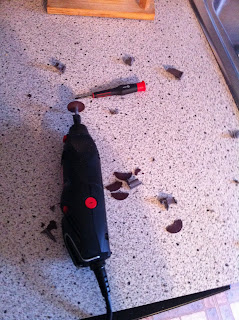
I've also been having some fun with my dremel. I took out the raised part of the plastic on the bottom of the casing and sanded down the excess plastic. I did take off a screw hole mount that the power button needs, but that won't be a big deal to fix. (I went through a few cutting pieces while doing this as you can see below)
I've also made a custom boot and login screen for Windows 7 to help mask the fact that it's Windows 7. Of course you are still going to be able to tell it's a PC when booting, but there are some things you can't avoid.
So for a short checklist, all of the NES data is on there, I've decided to add Game Boy as well since it was an 8 bit Nintendo System, and of course Boxee for Netflix (which I found wheel art for on the HS FTP site!) The motherboard (obviously) is here, kits are on the way to convert the original controller ports to USB, and I still have to order the pico psu.

I won't bore you with the many details of what I've been trying to do, but most of it sucks. I'm to the point where I can get the emulator closing with saving from HS, but can't do it from the controller.
I've also been having some fun with my dremel. I took out the raised part of the plastic on the bottom of the casing and sanded down the excess plastic. I did take off a screw hole mount that the power button needs, but that won't be a big deal to fix. (I went through a few cutting pieces while doing this as you can see below)
I've also made a custom boot and login screen for Windows 7 to help mask the fact that it's Windows 7. Of course you are still going to be able to tell it's a PC when booting, but there are some things you can't avoid.
So for a short checklist, all of the NES data is on there, I've decided to add Game Boy as well since it was an 8 bit Nintendo System, and of course Boxee for Netflix (which I found wheel art for on the HS FTP site!) The motherboard (obviously) is here, kits are on the way to convert the original controller ports to USB, and I still have to order the pico psu.


Subscribe to:
Posts (Atom)